Viva Connections, is a personalised desktop, and mobile app on the left rail of Teams.
This is how Leaders and Comms Teams can now easily reach the shop floor, a space that has frustratingly eluded them until now! They now have at their fingertips so many ways to engage ALL staff fast with:
- Corporate News Feed, intended for everyone in the company and ensures staff have access to the latest information that drives the brand on Modern SharePoint.
- Regional News Feed, that impacts how employees go about their day on Modern SharePoint.
- Location News Feed, for staff where they are based; perhaps a factory or a retail store and might include staff recognition, health and safety updates, local company sports an social clubs and staff charity events on Yammer.
- Employee Resource Groups for perhaps Working Parents, LGBTQIA+, Military, cultural or ethnic communities on Yammer.
- Shared interests with cycling, baking, pets and photography. Also excellent for when leaders visit sites and staff take selfies with the C Suite and share on Yammer.
- Events like Townhalls or team celebrations; if they missed an event can watch again on Stream, Microsoft’s version of YouTube.
- A dashboard to useful resources; where you manage your Tasks, and Shifts, booking a safe desk, read staff canteen menu, company address book, manage expenses, book holiday, read payslips etc
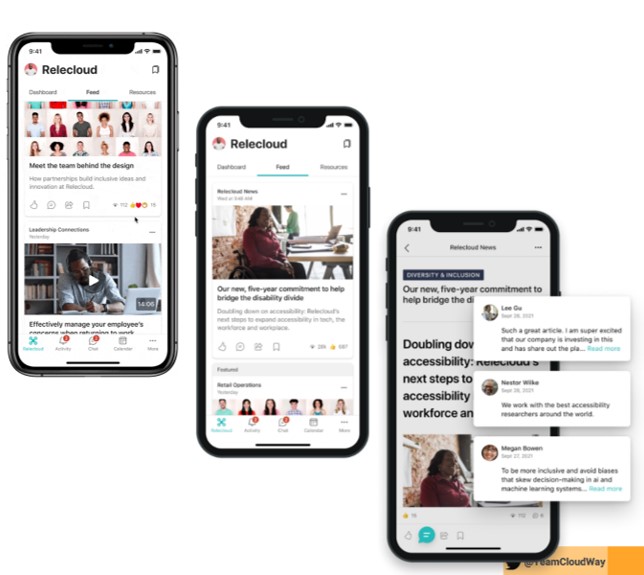
You could do all of this on SharePoint with Yammer webparts before; but it was limited on how you shared the content with all staff.
The big game changer! Viva Connections gives Front Line Workers easy access to company content through the left rail of Teams, on their own personal devices.
However, there appears to be 3 Frontline Worker device strategies in play:
- Access to a shared computer kiosk; as devices might not be allowed on the production lines; high security facilities like a prison, or a behavioural health units, or don’t have hands-free capabilities.
- Shared devices like at M&S with SurfaceGo2.
- Bring Your Own Device (BYOD) and/or access company content from a browser at home in your own time.
To enable employees to access company content from their own devices (BYOD), you need to protect your company data. Use Microsoft Intune a cloud-based service that focuses on mobile device management (MDM) and mobile application management (MAM). You control how the devices are used, including mobile phones, tablets, and laptops. You can also configure specific policies to control applications.
There are also Front Line Worker (FLW) license considerations. The main difference between Microsoft F1 and F3 Licenses is that F1 is an essential cloud solution for FLW workers of an enterprise and business. Microsoft F3 is a licensed feature for FLW and automates everyday tasks and procedures with Power Automate.
Many FLWs are already using their own devices to keep in touch unofficially on WhatsApp or Slack. Switching to access through the lens of Teams you get cloud security, compliance, collaboration and productivity features.
There has never been a better time to open up a FLW BYOD hybrid workplace, employee experience on Viva Connections.
My vision is that 5th Viva module, Ally.io to be introduced towards the end of next year, could make sharing corporate strategy news super easy. As the Comms Team might share Ally.io key results in Connections News on how the company is performing. And our personalised Dashboard might pull from business intelligent Topics aligned to our personal objectives. Nurturing a connected and engaged employee experience with real time data that possibly ALL staff can be part of.
Lots more here!
- MVP Merethe Stave blog, sssssSharePoint!
- Webinar: What you need to know about Intune Reporting (cloudway.com)
- Yammer Benchmarking Report 2021 – Swoop Analytics
- 3 ways to support frontline workers in a hybrid world – Microsoft 365 Blog
- What is Microsoft Intune | Microsoft Docs
- Engaging your Manufacturing Frontline Teams with Viva Connections (microsoft.com)
- Microsoft Customer Story-Marks & Spencer combines 137 years of experience with Microsoft 365 digital tools to usher in the future of retail


Leave a comment