“There are no stupid questions, only stupid answers.” The phrase encourages people to seek knowledge by asking questions, no matter how silly the questions may sound.
When you are new in a company, nothing is worse than knowing little about your responsibilities, where to find things quickly, and being a nuisance, so this feature is a great confidence builder.
Often the same questions a new hire would need to ask in their first three months.
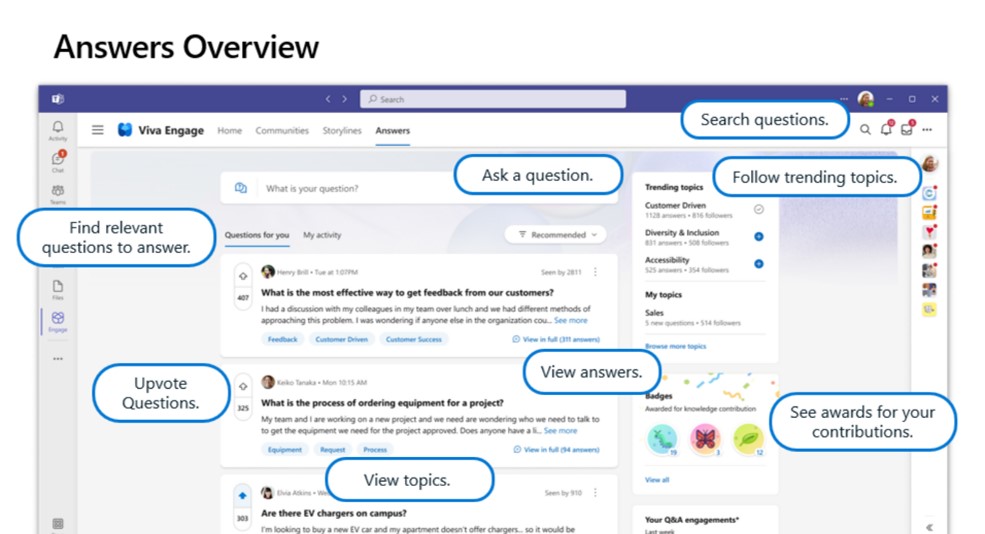
You will find an |Answers| tab next to the |Leaders| tab in Viva Engage. This internal crowdsourcing knowledge management platform connects employees to answers they need by asking and answering questions. Natural language processing helps match questions with any existing answers and connects employees based on their subject matter expertise captured in Viva Topics.
The best way to introduce Answers in Viva is to seed some questions. Seed Questions are “example questions” or, better yet, real questions repeatedly asked by staff. Collating seed questions before launch will ensure that the new feature is not silent. This will also give your subject matter experts time to prepare responses and give insight into the audience’s interest.
A good practice is to have about one hundred questions seeded spanning the whole organization. That sounds like many questions, but if you find ten subject matter experts who get asked ten questions repeatedly, it can be compiled effectively. Suggestions are SMEs in:
- Facilities Management
- Health and Safety
- Quality Management
- Compensation and Benefits
- Marketing
- Internal Communications
- Procurement
- Finance
- Training
- Social Clubs
- Shareholder guidance
Let’s focus on the business benefits of Answers in Viva using a profile of a new Retail Store Assistant wanting to know about the following:
- Customer product discounts.
- Staff discounts.
- Uniform guidance and dress code.
- Shift swapping.
- Transportation between stores.
- Job responsibilities.
- Hours of operation.
- Returns Policy.
- etc
When they start typing a post, they will get a helpful Copilot prompt with more related details to give more context. That’s the Ai practical skill of asking the right question to get the correct answer, and immediately the system starts to look for a question that has been asked before, so you don’t add related questions. This saves you time and, most importantly, a self-serving governed process.
By typing “discount,” it predicts previously asked questions about employee discounts and perks as it helpfully searches for other similar themes.
To complete the post, you must add a Viva Topic, and again you will be prompted from a predicted list of related topics. You can create a new topic card if this is an entirely new theme, and no Viva Topics are offered. Topics help to consolidate questions around themes.
For this example, it returned an external perks partner with a link to that. The new Retail Store Assistant got the answer they needed quickly and did not need to bother anyone else. They got a notification on Teams and email, so they did not need to return to colleagues pestering them for answers.
These features are perfect for Frontline Workers as they work on their own devices using SMS, Multi-Factor Authentication (MFA), and Microsoft Intune (MAM) policies in the flow of work on the Teams app.
This is not just about getting answers from robots. This is about connecting real people, sharing tacit knowledge in their heads, and automatically logging into a searchable system with intelligence that is not artificial and will remain after they leave to help others time after time.
Answers in Viva have powerful AI analytics on how much time has been saved by having these features, especially those frequently asked questions and what are the most impactful questions that are shaping the culture of a business.
For people in large organizations to learn from each other by asking and answering questions. To make a post, you must add a topic. This feature differentiates and adds a great deal of knowledge management value between a Viva Engage community post or a storyline post where you do need to add a topic. This topic will be integrated into Viva Topics. You can select a topic that already exists or create a new topic. By adding and using topics, you are enabling knowledge management.
Go here for Viva Answers in Viva Engage:
Note: This differs from the seeded Viva Engage Q&A and Best Answers features above.
Answers in Viva: Understanding Time Saved & People Helped – Microsoft Community Hub
 Sensai~teacher of AI
Leave a comment